
AI for Small Business: ChatGPT, Claude & Your First AI Staff
Key takeaways
- AI has three levels: chat (it answers), assistant (it drafts using your files and email) and agent (it owns a goal and does the work).
- Agents are the big shift. They run a loop of check, plan, act and verify, so they finish jobs instead of just answering questions.
- Cron jobs are an alarm clock for AI. Put an agent on a schedule and it starts its shift at 7am every weekday without you.
- You can build an AI staff: a front desk, a marketer, a bookkeeper, a researcher and a watchdog, with you as the boss.
- Start for $20 a month with ChatGPT Plus or Claude Pro, and follow the 30-day plan below.
- Keep a human gate on anything that spends money or talks to a customer.
Business owners ask me some version of the same question all the time: "Everyone keeps telling me to use AI. What does that actually mean for my business?"
This guide is my full answer, in plain English. No jargon, no hype. I build AI systems for a living, and my own company runs on a team of AI agents that work on schedules every day. By the end of this page you will know what ChatGPT, Claude and Claude Code are, what an AI agent is, why agents matter so much, what a cron job is, and exactly how to build your first AI staff member in 30 days.
What can AI actually do for a small business?
Short answer: AI can now do three levels of work. It can answer (chat), it can draft using your own files, email and calendar (assistant), and it can do whole jobs on its own, on a schedule, and check its own work (agent). Most businesses are stuck at level one. The money is in levels two and three.
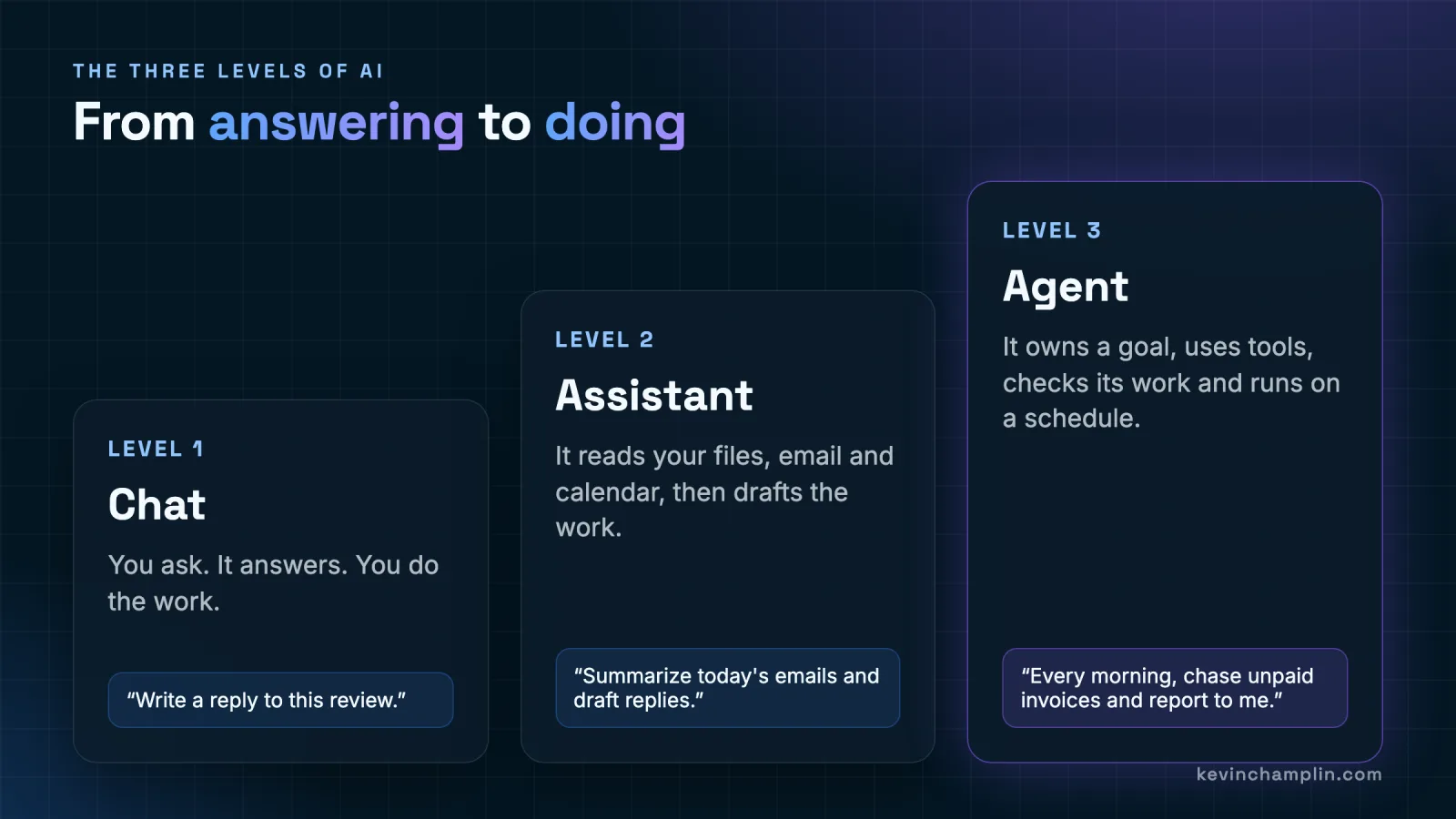
- Level 1, Chat. You ask, it answers, you do the work. Example: "Write a reply to this review." Useful, but you are still the one copying, pasting and sending.
- Level 2, Assistant. It reads your files, email and calendar, then drafts the work. Example: "Summarize today's emails and draft replies." You review and press send.
- Level 3, Agent. It owns a goal, uses tools, checks its work and runs on a schedule. Example: "Every morning, chase unpaid invoices and report to me." You get a summary, not a chore.
Think of it like hiring. Level one is a smart friend you can text. Level two is a capable assistant sitting next to you. Level three is an employee who shows up on time, does the job, and tells you what happened.
ChatGPT vs Claude vs Claude Code: which one should you use?
Short answer: Use ChatGPT as an easy all-rounder with built-in Agent mode and scheduled Tasks. Use Claude when writing quality, long documents and careful reasoning matter most. Use Claude Code when you want AI that works directly on files, websites and servers, which is how real automated agents get built. All three start at $20 a month as of October 2026.
| Tool | What it is | Best for | Starts at |
|---|---|---|---|
| ChatGPT (OpenAI) | The best-known AI chat app, with Agent mode and scheduled Tasks built in. | Everyday questions, research, quick drafts, simple recurring tasks. | $20/mo (Plus) |
| Claude (Anthropic) | An AI chat app known for clear writing and careful thinking. | Emails and proposals in your voice, long documents, contracts, analysis. | $20/mo (Pro) |
| Claude Code (Anthropic) | Claude that can read and change files and run commands on a computer or server. | Building websites, tools and the agents that run your business on a schedule. | Included with Claude Pro |
Prices checked October 2026. AI plans change often, so confirm on each provider's pricing page before you buy.
My honest advice: do not overthink the choice. Both chat apps are excellent. Pick one, use it every day for a week, and you will learn more than any comparison chart can teach you. Most of my day as an engineer is spent in Claude and Claude Code, and I wrote up how I run Claude Code eight hours a day if you want to see what heavy use looks like.
What is an AI agent, in plain English?
Short answer: An AI agent is AI that is given a goal instead of a single question. It works in a loop: it checks what changed, plans the next step, acts using a tool, then reviews the result and goes again until the job is done. A chatbot writes the email. An agent notices the email needs writing.
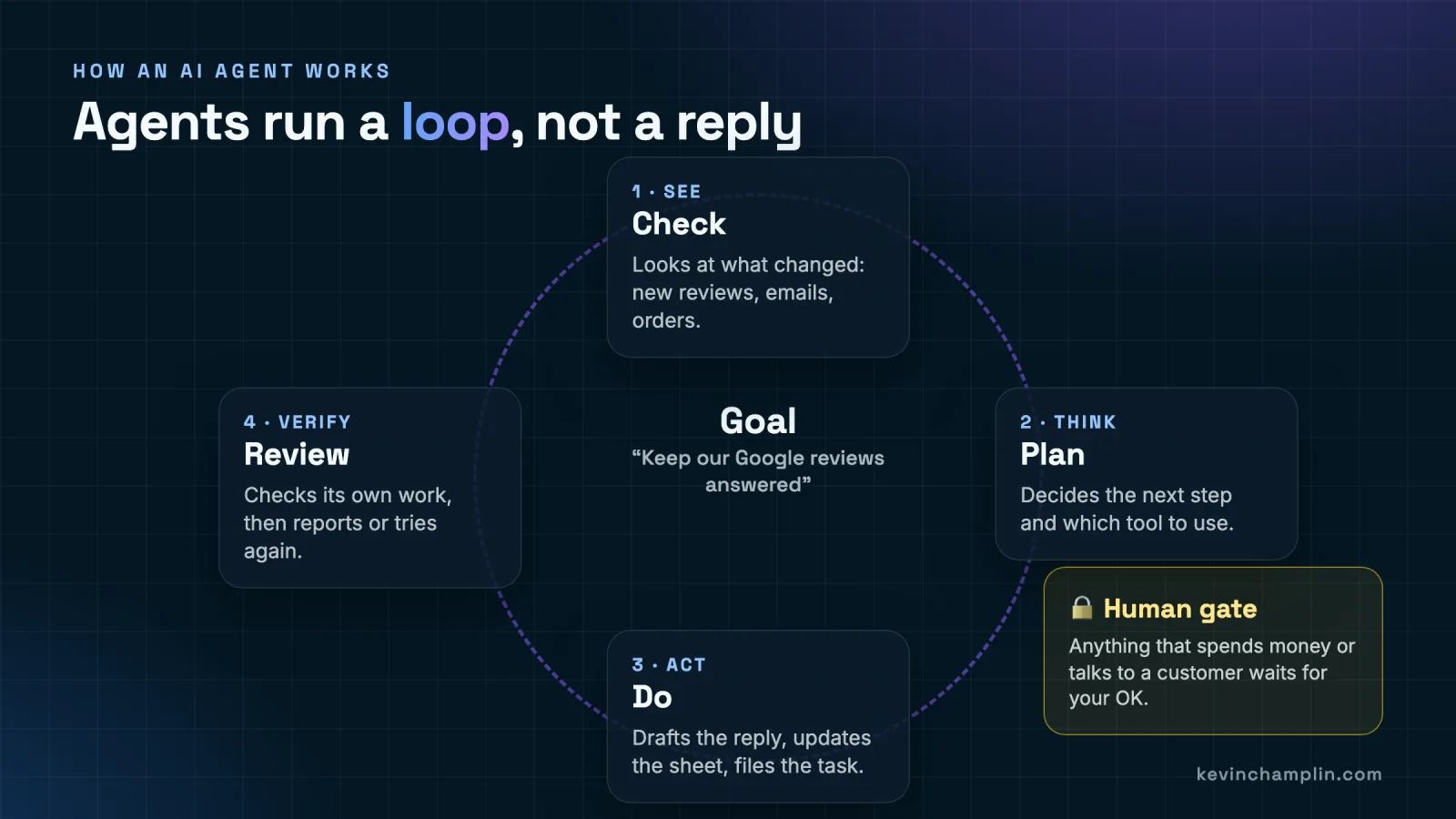
Here is the loop with a real goal, "Keep our Google reviews answered":
- See (check). The agent looks at what changed since last time: two new reviews, one five-star and one three-star.
- Think (plan). It decides the five-star review gets a warm thank-you and the three-star one needs an apology and an offer to make it right.
- Act (do). It drafts both replies in your voice and logs them in a sheet.
- Verify (review). It rereads the drafts against your rules (no discounts promised, no blaming the customer), fixes anything off, then sends you both for a one-tap approval.
The important part is the tools. An agent is only as useful as what it is allowed to touch: your inbox, your calendar, a spreadsheet, your website, your accounting software. Connecting those tools is what turns a clever chatbot into a worker. If you want to understand what is happening inside the AI itself, my interactive guide How AI Works explains it for non-engineers.
Why do AI agents matter more than chatbots?
Short answer: Because a chatbot saves you minutes and an agent saves you roles. A chatbot only works while you are typing. An agent works while you are with a customer, driving or asleep, and it handles the whole job, from noticing the task to reporting that it is done. That is the difference between a tool and a staff member.
- They do not wait for you. A chatbot sits idle until you open it. An agent starts on its own, on a schedule or when something happens.
- They finish jobs, not steps. Instead of handing you a draft to copy and paste, an agent drafts, files, updates and reports.
- They are consistent. The invoice follow-up happens every single Tuesday, not just on the weeks you remember.
- They stack. Once one agent works, the second one is easier, and a team of small, focused agents beats one giant do-everything bot.
For a small business, that last point is the whole game. You probably cannot afford five new hires. You can absolutely afford five focused AI agents, each doing one boring job well.
What is a cron job, and why does your AI need one?
Short answer: A cron job is an alarm clock for a computer. You write down a time and a task, and the server runs that task at that time, every time, without anyone pressing a button. Pair a cron job with an AI agent and you get an employee who starts their shift exactly on schedule, every day.
Cron has been running the internet's background chores for decades. A cron schedule is five little fields: minute, hour, day of the month, month and day of the week. This one line means "7:00am, Monday to Friday":
0 7 * * 1-5   run-morning-briefing

# minute 0, hour 7, any day of month, any month, Monday(1) to Friday(5)
You do not need to memorize that. The point is the idea: a server never forgets, never sleeps in and never takes a sick day. Put an AI agent behind that alarm clock and it does its job at 7am whether you are awake or not.
No server? Start here. ChatGPT's scheduled Tasks let you set up recurring jobs (like a daily briefing) right inside the app, no server required. When you outgrow that, a small server running cron plus an AI agent built with a tool like Claude Code gives you full control over what runs, when, and with which permissions.
How do you build your own AI staff?
Short answer: Treat it like hiring. Write a short job description for each agent, give it only the tools that job needs, put it on a schedule, and put an AI manager on top that hands out work, checks it and sends you one summary. You stay the owner: you set goals and approve money and customer messages.
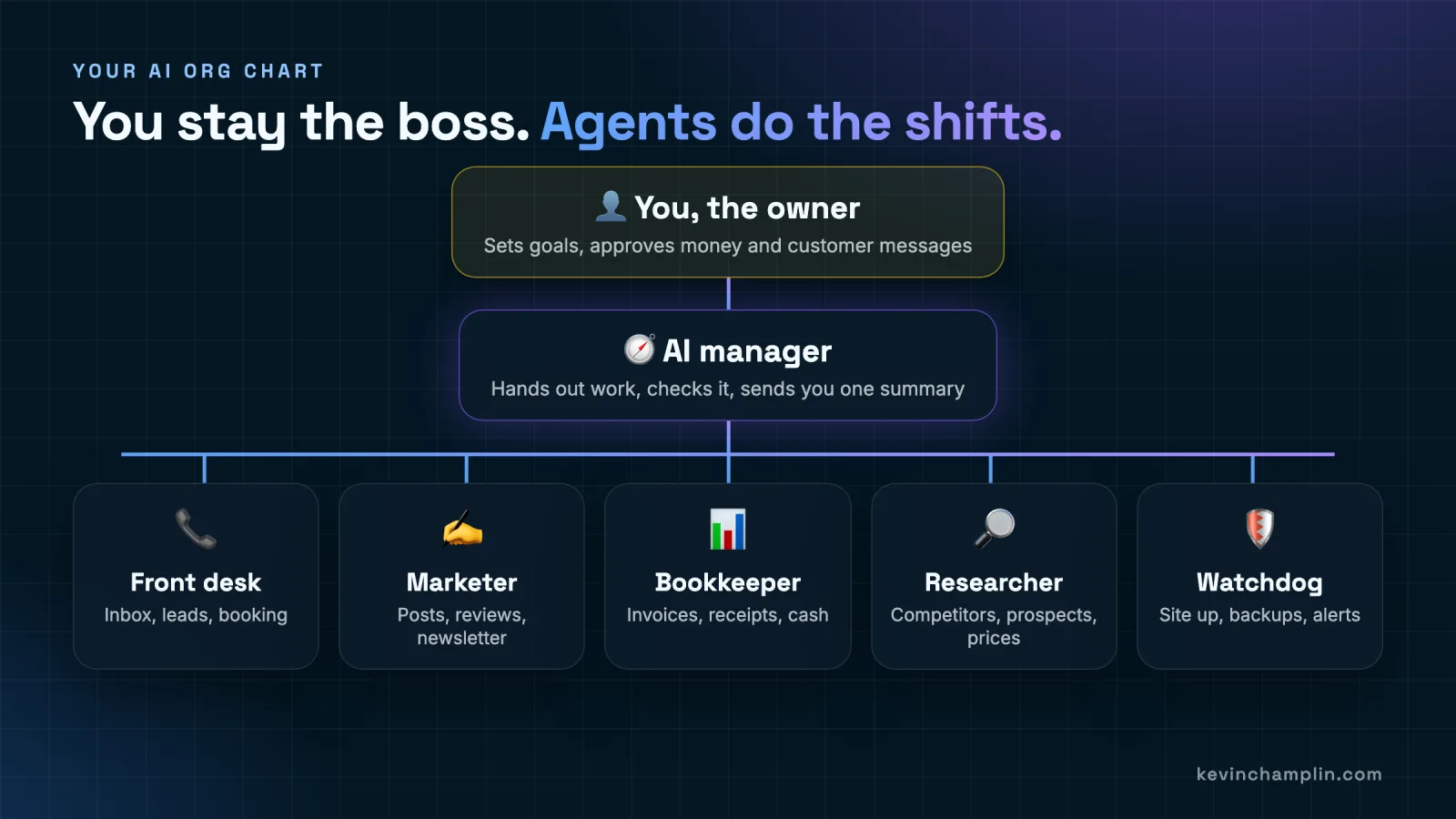
Here is a starter AI staff that fits almost any small business. The AI manager in the chart is the "chief of staff" in the schedule below: same job, it runs the briefing and keeps everyone else in line. The sales assistant works alongside the front desk.
| AI staff member | Their job | Tools it needs | When it works |
|---|---|---|---|
| AI manager (chief of staff) | Hands out work, checks it, sends you one morning summary. | Read access to the other agents' reports, your calendar. | 7am weekdays |
| Front desk | Sorts the inbox, tags leads, drafts replies, proposes call times. | Email, calendar, contact list. | 6am daily |
| Sales assistant | Follows up on quotes that went quiet, for your approval. | Email drafts, your quote list. | 10am |
| Marketer | Drafts review replies, social posts and the newsletter. | Review site, social scheduler, brand notes. | 2pm |
| Bookkeeper | Flags unpaid invoices, odd charges and this week's cash. | Read-only access to accounting. | 5pm |
| Researcher | Watches competitors' prices and finds new prospects. | Web search, a shared notes doc. | Weekly |
| Watchdog | Checks your website is up, runs backups, alerts you if not. | Your website and hosting. | 2am nightly |
Three rules make this work:
- One job per agent. A focused agent with a one-paragraph job description beats a "do everything" bot every time.
- Least access. The bookkeeper gets read-only access to the books. The marketer never sees the bank account.
- Written instructions. Your prices, your tone, your "never do this" list. Agents are only as good as the onboarding you give them, exactly like people.
What does a day with an AI staff look like?
Short answer: Before you wake up, the inbox is sorted and the website is backed up. At 7am you get one briefing. During the day, follow-ups, review replies and bookkeeping checks happen on schedule and land as drafts for your approval. Your job shrinks to the decisions only you can make.
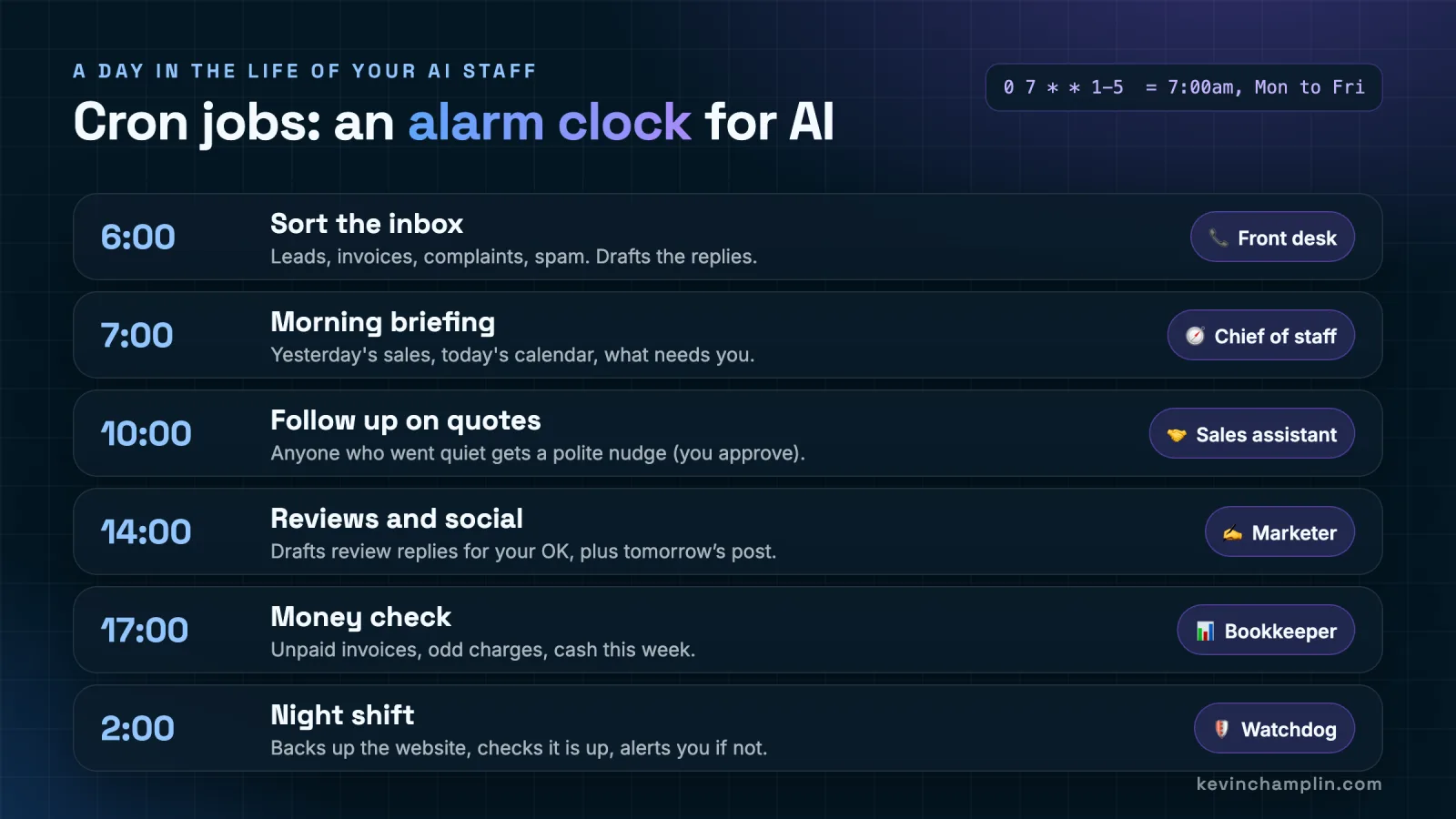
- 6am, Front desk: sorts the inbox into leads, invoices, complaints and spam, and drafts the replies.
- 7am, Chief of staff: sends your morning briefing: yesterday's sales, today's calendar, what needs you.
- 10am, Sales assistant: anyone who went quiet on a quote gets a polite nudge, after you approve it.
- 2pm, Marketer: drafts replies to new reviews for your OK, plus tomorrow's social post.
- 5pm, Bookkeeper: unpaid invoices, odd charges and cash for the week.
- 2am, Watchdog: the night shift. Backs up the website, checks it is up and alerts you if not.
How do you get started? A 30-day plan
Short answer: Week 1, use AI every day. Week 2, teach it your business. Week 3, put one task on a schedule. Week 4, build your first agent with guardrails. In a month you go from your first prompt to your first AI employee, without a big project or a big budget.
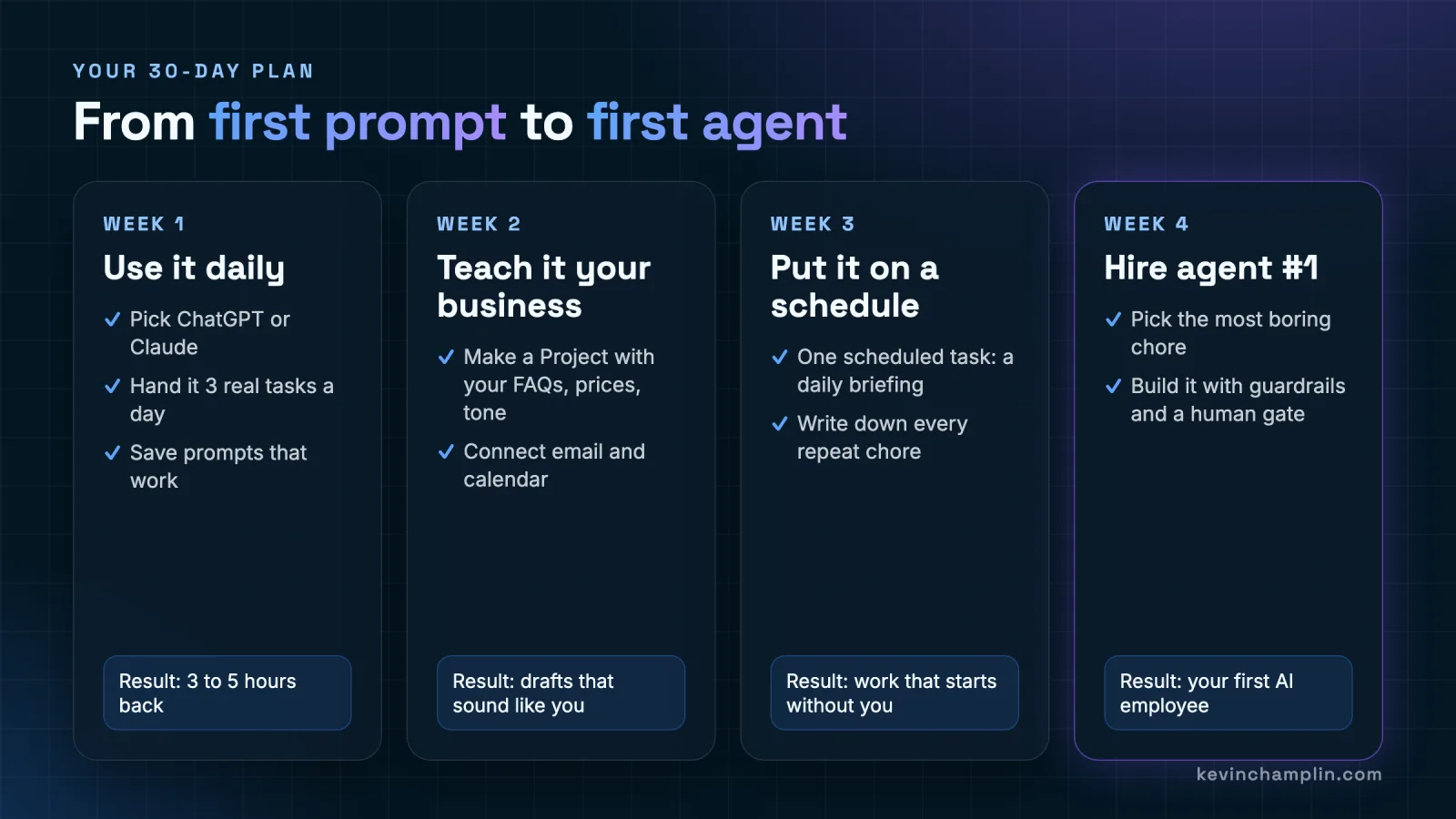
Week 1: Use it daily
- Pick ChatGPT or Claude. Either is fine.
- Hand it three real tasks a day: an email, a summary, a plan.
- Save the prompts that work in a simple doc.
- Goal: three to five hours back this week, and a feel for what it is good at.
Week 2: Teach it your business
- Create a Project (both ChatGPT and Claude have them) and load your FAQs, price list, service descriptions and a few emails that sound like you.
- Connect your email and calendar so it can draft with real context.
- Goal: drafts that sound like you, not like a robot.
Week 3: Put it on a schedule
- Set up one scheduled task, such as a daily 7am briefing.
- All week, write down every chore you repeat. That list is your hiring plan.
- Goal: work that starts without you.
Week 4: Hire agent #1
- Pick the most boring chore on your list.
- Build it as an agent with a written job description, least access and a human gate.
- Goal: your first AI employee, running on its own.
What should you never automate with AI?
Short answer: Never let an agent spend money, sign anything, make promises to customers or delete data without a person approving it first. Never paste passwords, card numbers or health records into a chat. Automate the preparation, and keep the final yes or no for a human.
- The human gate. Anything that spends money or talks to a customer waits for your OK. The agent does nearly all the work and you spend a few seconds approving it.
- Least access. Give each agent only the tools its job needs, and read-only wherever possible.
- Business plans for business data. Use team or business tiers where your conversations are not used for training, and read the data settings.
- No secrets in chat. Passwords, API keys, card numbers and medical records never go into a prompt.
- A second check. For anything important, have one agent do the work and a second one review it, the same way a manager checks a new hire.
- A paper trail. Every agent should log what it did, so you can see exactly what happened and when.
If you work in a regulated field like healthcare, finance or insurance, guardrails need to live in the system, not just in the instructions. I go deep on that in why AI agent guardrails fail a compliance audit.
How much does AI cost for a small business?
Short answer: You can start for $20 a month. ChatGPT Plus and Claude Pro are both $20 a month as of October 2026, and Claude Pro includes Claude Code. Agents that run on your own server add hosting and usage-based AI costs that grow with how much work they do, so add agents one at a time and measure the hours each one saves.
- Level 1 and 2 (chat and assistant): one $20 plan per person who uses it.
- Level 3 inside the app: ChatGPT Plus already includes Agent mode and scheduled Tasks.
- Level 3 on your own server: hosting plus pay-as-you-go AI usage. This is where a one-time professional setup pays for itself, because a well-built agent runs for months without attention.
The right question is not "what does AI cost?" It is "what does an hour of my time cost?" If an agent saves you five hours a week, it is the best-value hire you will ever make.
How do we run our own company on AI agents?
Short answer: At Champlin Enterprises we run a named team of AI agents on schedules every day. Each one has a single job, written instructions and limited access: one engineers code, one reviews every change before it ships, one works the sales pipeline, one drafts invoices but never sends them, one watches our servers overnight. I manage them the way you would manage people.
This guide is not theory. Everything in it is how my own company works:
- Every agent has a name, a job description and a playbook. When an agent makes a mistake, the lesson gets written into its playbook so it does not happen twice.
- Schedules do the starting. Agents wake up on cron, do their rounds, and report back. Nobody has to remember to run them.
- A second agent checks the first. Code is reviewed by a separate reviewer agent before it ships, and client notes are checked against the facts before they go out.
- Money stays behind a human gate. Our billing agent prepares invoices. A person sends them.
- Kill switches everywhere. Any automated worker can be paused with one switch, instantly.
We wrote up the full system, including how the agents ship code with tests and guarded deploys, on the Dembe OS page. If you are curious how agents avoid stepping on each other, I also explained how we keep parallel AI agents from colliding.
Get a free AI Opportunity Audit See how our AI agents run a company
Frequently asked questions about AI for small business
Is ChatGPT or Claude better for a small business?
Both are excellent, and both cost $20 a month for the main paid plan as of October 2026. ChatGPT is the easiest all-rounder and includes Agent mode and scheduled Tasks. Claude is especially strong at writing in your voice, long documents and careful reasoning, and its Pro plan includes Claude Code. Try both for a week and keep the one you reach for.
What is the difference between an AI chatbot and an AI agent?
A chatbot answers one question and stops. An AI agent is given a goal, then works in a loop: it checks what changed, plans a step, uses a tool to do it, reviews the result and repeats until the job is done. A chatbot writes the email. An agent notices the email needs writing, drafts it and queues it for you.
Do I need to know how to code to use AI agents?
No. ChatGPT's Agent mode and scheduled Tasks work from a normal chat window. Coding helps when you want agents running on your own server around the clock, and that is a good point to bring in help to set it up once.
What is a cron job in plain English?
A cron job is an alarm clock for a computer. You write down a time and a task, and the server runs that task at that time, every time, without anyone pressing a button. Pair a cron job with an AI agent and you get an employee who starts their shift on schedule.
What tasks should a small business automate with AI first?
Start with boring, repeated, low-risk work: sorting the inbox, a morning summary of sales and calendar, first drafts of review replies and social posts, chasing unpaid invoices for your approval, and checking that your website is up. Leave anything that spends money or makes promises to customers behind a human approval step.
Is it safe to give AI access to my business data?
It can be, with care. Use business or team plans where your conversations are not used for training, give each agent only the access its job needs, never paste passwords or card numbers into a chat, and keep a human approval step on anything that sends money or messages a customer.
How much does it cost to run AI for a small business?
You can start for $20 a month with ChatGPT Plus or Claude Pro (as of October 2026). Agents that run on your own server add hosting and usage-based AI costs that scale with how much they do, so start with one agent, measure the hours it saves, then add the next.
How long does it take to set up a first AI agent?
With the 30-day plan in this guide, you can go from your first prompt to a working first agent in about a month: one week building the habit, one week teaching the AI your business, one week on a schedule, and one week building a single agent with guardrails.
About the author
Kevin Champlin is the Founder & Principal Engineer of Champlin Enterprises, an AI-native software company. He builds AI products and agent systems for businesses, and runs his own company on a team of scheduled AI agents.
Have an AI question about your business? Ask Kevin directly, or start with a free AI Opportunity Audit of your website.
Links mentioned