
WordPress 7.0 Readiness Checklist: What Breaks on May 20 (and How to Audit Your Stack Before It Ships)
WordPress 7.0 ships on May 20, 2026 — the first major release of 2026 and the biggest core update in years. It lands with a new AI Client, the DataViews overhaul of wp-admin, Block API version 3 enforcement, and a higher PHP floor. Real-time collaboration, the headline Phase 3 feature, was pulled at the last minute.
I've spent 17+ years building and operating WordPress at every scale, from solo-author sites to multi-region enterprise stacks behind WAFs and SSO. Below is the readiness checklist I'm running across my own production fleet before Wednesday — written for senior engineers, agency leads, and anyone responsible for a WordPress site that actually matters.
TL;DR — WordPress 7.0 in 30 seconds
- Release date: May 20, 2026 (release lead: Matias Ventura)
- Scope: 419+ Trac tickets, 76+ enhancements, 300+ bug fixes. 90+ tickets in
wp-adminalone. - New PHP minimum: PHP 7.4 — sites still on PHP 7.2 or 7.3 won't auto-update and stay on the 6.9 branch.
- Biggest dev-facing change: DataViews replaces
WP_List_Tableon Posts, Pages, and Media. Classic admin-column and bulk-action hooks are not fully integrated. - Biggest user-facing change: The WP AI Client and Abilities API land in core with provider plugins for Anthropic, OpenAI, and Google.
- What didn't ship: Real-time collaboration was removed from 7.0 over surface-area, race-condition, and memory-efficiency concerns. Phase 3 continues into 7.1 and beyond.
- The smart move: Don't update production on day one. Test against RC3 on staging, wait for 7.0.1 (~2 weeks), and stage rollouts behind a canary cohort.
What's actually shipping in WordPress 7.0
This is the most consequential core release since the Site Editor landed. The headlines:
- DataViews replaces WP List Tables on the Posts, Pages, and Media screens. List, grid, and table views with inline filtering, sorting, bulk operations, and persistent view preferences — all without full page reloads.
- The WP AI Client — a provider-agnostic PHP API plugins call through
wp_ai_client_prompt(). Three official provider plugins ship alongside core: "AI Provider for Anthropic," "AI Provider for OpenAI," and "AI Provider for Google." API keys are managed centrally under Settings > Connectors. - The Abilities API — a structured way for plugins, themes, and core to expose capabilities in both human- and machine-readable form, with an MCP (Model Context Protocol) integration path.
- Block API version 3 with an enforced iframed editor when every block on a post is on v3+. Lower versions fall back to non-iframed for backwards compatibility.
- PHP-only block registration — declare
'supports' => array( 'autoRegister' => true )with a render callback and the block is auto-exposed client-side. No JavaScript build step required for purely server-rendered blocks. - Two new core blocks: Breadcrumbs and Icons. The Cover block now accepts embedded video as a background. The Grid block becomes responsive. The Gallery block gets native lightbox.
- Per-device block visibility — hide or reveal individual blocks by device type natively, without a plugin.
- Interactivity API:
watch()replaceseffect(), andstate.urlis now populated server-side during directive processing. - Multi-block notes and partial-selection rich text editing. Editorial workflows finally get inline annotations across block boundaries.
- Library bumps: Backbone.js 1.6.1, Requests 2.0.17, CodeMirror v5, Espree replacing Esprima for ES6 support, PHPMailer 7.0.2.
What WordPress 7.0 won't ship: real-time collaboration
For a release that was supposed to be the Phase 3 collaboration milestone, the most newsworthy thing about WordPress 7.0 is what's not in it. Real-time collaboration was pulled from the release on May 8, 2026 over a stack of concerns: surface area, race conditions, server load, memory efficiency, and recurring bugs surfacing through fuzz testing.
The infrastructure stays — the database table is still part of the schema and the Phase 3 direction is intact. But the user-facing feature shifts to 7.1 (planned for August 2026) or later. If you sold a stakeholder on Google-Docs-style co-editing landing in May, that conversation needs to happen this week, not next month.
WordPress 7.0 server requirements: PHP and database
What PHP version do I need for WordPress 7.0?
PHP 7.4 is the new minimum. Sites running PHP 7.2 or 7.3 cannot upgrade to 7.0 and will remain on the WordPress 6.9 maintenance branch until they upgrade their PHP. PHP 8.3 or 8.4 is recommended — the AI Client and DataViews both benefit measurably from the JIT and the newer engine improvements.
Practical implication: if you're on managed shared hosting, check your control panel now rather than at 9 a.m. on update day. PHP version flips are usually one click; rollback if a custom plugin or theme tries to dereference a deprecated function is not.
Database requirements
MySQL 8.0+ or MariaDB 10.6+ is recommended. WordPress will still run on older versions, but the new RTC scaffolding tables and several DataViews query patterns assume modern JSON column and CTE support. Hosting providers running MySQL 5.7 should plan a managed migration window.
WordPress 7.0 breaking changes that will hit your plugin stack
This is the table I wish more upgrade posts led with. These are the concrete API surfaces that change in 7.0 and the plugin categories most likely to break.
DataViews            manage_posts_columns / manage_posts_custom_column / bulk_actions
                     →  Not fully integrated with DataViews in 7.0. Plan to revisit.

DataViews API        groupByField: 'status'
                     →  groupBy: { field, direction, showLabel }   (breaking)

Interactivity API    effect()
                     →  watch()

Navigation state     state.navigation.hasStarted / hasFinished
                     →  watch(() => state.url)

Block API            apiVersion: 2 (no iframed editor enforced)
                     →  apiVersion: 3 (iframed editor enforced; plan for sandbox)

Meta boxes           add_meta_box() classic UI
                     →  Disables RTC for that post type. Prefer register_post_meta()
                        + REST API + custom block where you can.

Heading block        Single core/heading with `level` attribute
                     →  Individual H1–H6 variations (style registration changes)

Theme support        add_theme_support('html5', ['script'])
                     →  Deprecated. The script loader no longer honors it.

Author link funcs    Title attributes on three author link helpers
                     →  Removed by default. Opt back in with $use_title_attr.

User registration    Administrator / Editor in default-role dropdown
                     →  Removed. Filter: default_role_dropdown_excluded_roles

Multisite spam       Sites auto-flagged as spam when user flagged
                     →  No longer the default. Re-implement via plugin if needed.

PHP minimum          PHP 7.2 / 7.3
                     →  PHP 7.4 minimum. 8.3+ recommended.
The single highest-risk category is any plugin that customizes the wp-admin post-list experience: custom columns, bulk actions, list-table filters, admin theme plugins, page builders with admin hooks (Elementor, Divi, Beaver Builder, Bricks). DataViews replaces the underlying surface those hooks attached to. WordPress core is working on third-party content type integration, but it has not landed yet.
The WordPress 7.0 readiness checklist
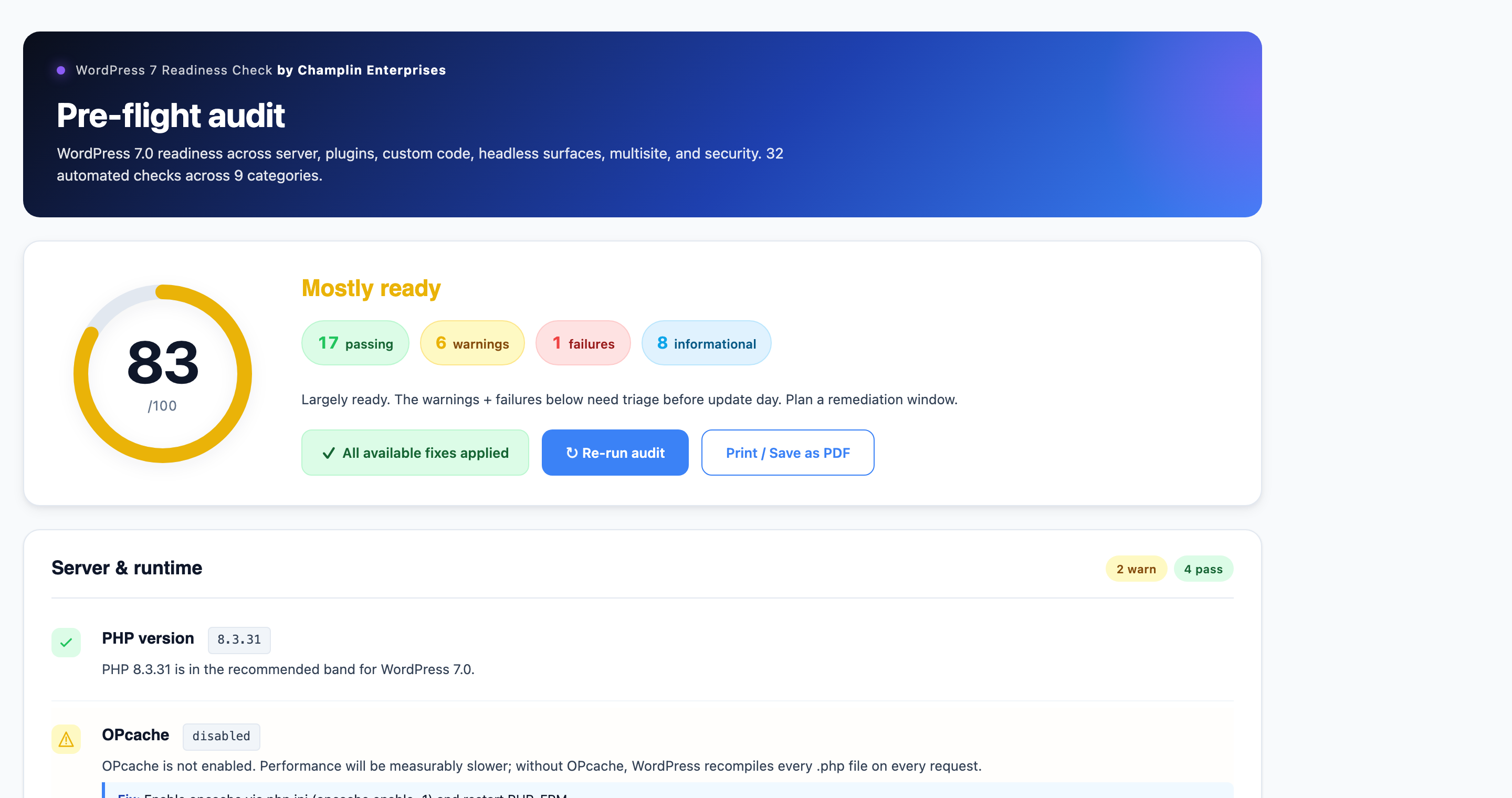
Run this list against every site you own before update day. The version I use across enterprise stacks is more detailed, but this captures the 90% you need.
1. Server & infrastructure
- Confirm PHP version is 7.4 or higher (8.3+ strongly recommended).
php -von the CLI, or check your hosting control panel. - Confirm MySQL 8.0+ or MariaDB 10.6+. Anything older still works but should be on a migration plan.
- Take a full server snapshot — files and database. The RTC schema table is part of 7.0 even though the feature is pulled, which means file-only rollbacks won't fully revert a 7.0 update.
- Verify your backup is restorable. An untested backup is a hope, not a backup.
- If you use a CDN or WAF (Cloudflare, Sucuri, Imunify), bump the rule sets to "WordPress 7.0 compatible" or temporarily relax learning mode. DataViews fires more REST requests than the old list tables; aggressive WAFs can rate-limit your admin.
- For dedicated PHP-FPM pools, plan for an opcache flush after the upgrade —
USR2the master, or kill-respawn if it sticks.
2. Plugins & themes
- Pull the latest plugin and theme changelogs. Anything maintained will mention "WordPress 7.0" or "DataViews compatibility" in the last 30 days. Unmaintained plugins are the single largest risk vector.
- Specifically verify: WooCommerce, ACF / ACF Pro, Yoast SEO, Rank Math, WPML / Polylang, Gravity Forms, Elementor, Divi, Beaver Builder, Bricks, GeneratePress, Astra, Easy Digital Downloads, MemberPress, LearnDash, WP Rocket, WP Engine's stack if you're hosted there, and any premium booking or CRM plugin.
- Run the Plugin Compatibility Checker against your stack on staging.
- Audit every plugin that touches the admin UI: custom post columns, bulk actions, custom admin pages, admin theme plugins, and any "white-label dashboard" plugins. These are the most likely DataViews casualties.
- Check your active theme's
functions.phpforadd_theme_support('html5', ['script'])and for hooks into the heading block. Update or remove.
3. Custom code & integrations
- Grep your codebase for:
manage_posts_columns,manage_posts_custom_column,bulk_actions-,WP_List_Table,groupByField,effect((in Interactivity API contexts),state.navigation.hasStarted,state.navigation.hasFinished,add_theme_support('html5', ['script'], and any custom block withapiVersion: 2. Every hit is an audit point. - Block authors: bump custom blocks to
apiVersion: 3and verify they render correctly inside the iframed editor. If a block readswindowordocumentdirectly, switch touseRefEffect. - If you use classic meta boxes via
add_meta_box()on a CPT, know that doing so will disable real-time collaboration for that post type once RTC ships in a later release. Where possible, migrate toregister_post_meta()with a custom block. - REST clients (headless front ends, mobile apps, partner integrations): test against RC3 with verbose logging. The REST API surface is mostly stable, but new endpoints exist around the AI Client and DataViews.
- If you build with the Interactivity API, swap
effect()forwatch()and re-test navigation tracking.
4. Multisite, SSO & enterprise concerns
- Multisite networks: confirm none of your subsite admin customizations depend on the old
WP_List_Tablebulk-action surface. - Spam-flag behavior changed: networks no longer automatically mark sites as spam when their user accounts are flagged as spam. If your network relied on this for content moderation, re-implement as a plugin or admin workflow.
- User-registration default roles: Administrator and Editor are removed from the default-role dropdown. Use the new
default_role_dropdown_excluded_rolesfilter if you need to customize. - If you run SSO (SAML, OIDC, Okta, Azure AD) plugins, verify the plugin author has tested against 7.0. Custom
capabilities+ role-mapping plugins are an under-discussed risk area. - For regulated stacks (HIPAA, SOC 2, FedRAMP-adjacent): the AI Client is opt-in per plugin, but you should still draft a policy now for which providers, if any, are allowed to be configured under Settings > Connectors. Default to "none" until your DPA is signed.
- Audit your audit trail. Some compliance plugins log via classic meta box hooks; verify they still capture writes that come through the new register_post_meta + REST path.
5. Performance, caching & WAF
- DataViews uses REST under the hood. Page caches that exclude
/wp-admin/are unaffected; object caches (Redis, Memcached) often need a flush after the upgrade so the new DataViews schema cache primes correctly. - If you front WordPress with Cloudflare's WAF in "I'm under attack" mode, expect false-positive lockouts on the new admin AJAX patterns until you tune rules.
- WP Rocket, W3 Total Cache, LiteSpeed Cache, and similar: bump to the latest 7.0-tested release before update day.
- If you serve
wp-adminbehind a separate FPM pool with PrivateTmp enabled, plan for a full FPM restart, not a reload — and confirmsys_temp_dirisn't pointing at a path that gets nuked by your nightly /tmp cleanup. (Yes, I've been bitten by this one in the wild.)
6. The day-of playbook
- Do not auto-update on May 20. Disable WordPress core auto-updates on production sites until at least 7.0.1.
- Test the full update on a clean staging clone with your real plugin stack, real database, and real traffic patterns.
- Smoke-test the body of pages, not just HTTP 200s. Plesk and Nginx will happily return 200 on a broken Laravel- or WordPress-driven page; the failure mode is in the rendered HTML.
- Roll out to a canary cohort (one site, or 5% of a multisite network) for 48 hours before fleet-wide rollout.
- Have a tested rollback ready — file restore + database restore. Test the rollback on a sacrificial copy before you need it.
- Once you're live on 7.0, flush every cache layer in order: opcache, object cache, page cache, CDN. Then verify featured posts, search, and the contact form actually work end-to-end.
A senior engineer's take on the enterprise risk
I work with stacks where a 30-minute admin outage costs more than most consultancies bill in a year, and the WordPress 7.0 transition has a recognizable shape: a meaningful, mostly safe core upgrade gated by a long tail of third-party plugin and custom-code risk. The same shape as the Gutenberg cutover, and the PHP 7 → PHP 8 transitions before it.
What's different this time is the AI Client. For the first time, WordPress core ships a sanctioned path for plugins to call OpenAI, Anthropic, or Google. Your security and compliance teams should hear about this before they read it in a vendor pitch deck. The Connectors UI is admin-only and opt-in, but a single Editor with the right cap and a credit card can change your exposure profile overnight. Write the policy now.
The DataViews story is more mundane: dashboards built for power users finally get a power-user interface. The cost is one more cycle of "is my plugin compatible?" The benefit is that the next decade of WordPress admin no longer feels like 2009.
Frequently asked questions about WordPress 7.0
When is WordPress 7.0 released?
WordPress 7.0 is scheduled for release on May 20, 2026. The release lead is Matias Ventura. The original April 9 target was extended to allow for additional architectural work on real-time collaboration, which was ultimately pulled from the release.
Does WordPress 7.0 break my plugins?
It can. The highest-risk categories are plugins that customize the wp-admin post list (custom columns, bulk actions), interactive blocks built against Block API v2, plugins that hook into the Interactivity API's old effect() function, custom blocks that touch window or document directly, and any plugin still relying on the deprecated HTML5 script theme support. Test on staging against the 7.0 release candidate before updating production.
Will WordPress 7.0 have AI features out of the box?
No user-facing AI features ship enabled by default. WordPress 7.0 ships the infrastructure: the WP AI Client API (wp_ai_client_prompt()), the Abilities API, and three official provider plugins for Anthropic, OpenAI, and Google. Admins must configure API keys under Settings > Connectors for anything to actually call out to a model.
Did real-time collaboration ship in WordPress 7.0?
No. Real-time collaboration was removed from the 7.0 release on May 8, 2026 due to concerns around surface area, race conditions, server load, memory efficiency, and recurring bugs found in fuzz testing. The feature is expected to land in a later release, with continued work through Phase 3.
What PHP version do I need to run WordPress 7.0?
PHP 7.4 is the new minimum. PHP 8.3 or 8.4 is recommended for best performance. Sites running PHP 7.2 or 7.3 will not auto-update and will remain on the WordPress 6.9 branch.
Should I update to WordPress 7.0 on launch day?
On a production site that matters: no. Wait for 7.0.1 (typically released within two weeks of a major), test on staging with your full plugin and theme stack, and roll out behind a canary cohort. Disable core auto-updates on production for the launch-week window.
The bottom line
WordPress 7.0 is a confident, technically ambitious release that mostly does what it says on the tin — and then takes the most ambitious item off the menu at the last minute. For senior engineers and agency operators, the work this week is unglamorous: audit the stack, push the plugin updates, draft the AI-Connectors policy, test the rollback, plan the canary. The teams that did this work last week will sleep through Wednesday. The teams that didn't will spend Thursday on a war-room bridge.
If you do one thing today, make it this: grep your codebase for the seven API surfaces in the breaking-changes table above, and fix the hits before they fix you.
About the author. Kevin Champlin is a senior software engineer who has shipped WordPress at every scale for the better part of two decades — from local newsroom multisites to Fortune-100 marketing platforms behind SSO and global WAFs. He currently splits time between Champlin Enterprises client work and a slate of his own SaaS products, and is selectively booking 2026 engagements — Principal/Lead Applied AI Engineer, senior+ SWE, and engineering manager / tech lead roles where the bar is shipping production systems, not slide decks.